CLICK HERE FOR BLOGGER TEMPLATES AND MYSPACE LAYOUTS »
Showing posts with label maths games. Show all posts

Friday, May 29, 2009

Games to Teach Mutliples/Factors

See the review below for Number Cop.

While searching for other games for my students to try out I also found the following

Pumpkin Multiples Simple game where you can chose a multiple then you have to move a cute little ghost to "catch" the numbers it is a factor of. At the end of the game it tells you your score and reminds you of the numbers that are multiples of your target number.

Product Game A little more challenging, but a 2 person game, suitable for an IWB. Students use their knowledge of timestables and a little strategy to win a "Connect 4" type game.

Grid Game A simple grid game where students have to find the factors of a given number OR find the odd or even numbers.

A smartboard resource can also be downloaded here and a bubble popping game (no download needed) here.

A trial version of Prime Time Maths, which is a tetris style game, can be downloaded. Even the first level is enough to reinforce factor trees. The only way to get rid of 8 is to click 2x2x2 and 18 3x3x3 (so cubed numbers as well!!!).

Number Cop

Number Cop I have to confess I spent way too much time playing this game this morning.

I was looking for a game that could be used by my students to reinforce prime/composite numbers. Part of the learning cycle is to learn about factors & multiples.

The game has 3 levels of difficulties and you can chose to "chase down" prime numbers, rational numbers, fractions in their lowest forms, or square numbers. You can also just leave the selection blank and click one of the numbers on the number pad to play a multiples game.

The graphics are fun and it sends out enough numbers to make even the lowest level fun and challenging.

As an added bonus there is feedback both during the game and at the end of the game to tell the students which numbers were wrong and why.

Interactive Whiteboard Maths

The following are just a list of links to maths games that are good for groups on the IWB. They do not require keyboard input to answer questions.

ADDITION

Maths Baseball - Addition Game that caters for different abilities in a class.

Numbers - Addition game that moves very fast! Can be downloaded or played online.

SUBTRACTION
Snowball Fight - Solve subtraction problems correctly and you get to throw the snowball, make a mistake and it splatters right on the screen!


MULTIPLICATION

Egg Static Drop - Multiplication Game where you have to catch eggs for multiples of a chosen number.


Pizza Pizzazz - Solve a multiplication question and deliver a pizza to the table with the number that matches the answer.


Disco Dino - Another mutliplication solving game, but at the end you get to create a dinosaur dance!


Fish - Similar to Pizza & Disco but these fish are fast!


NUMBERS
Splat Square is a simple 100's chart but with sound effects and colours. Play games like "What Number Comes Before?" Other ways of intergrating the grid into lessons can be found here and here.


Gamebone is another fun way of using a 100s chart to learn.


Thursday, May 28, 2009

Arcademic Skill Builders

Arcademic Skill Builders promise the following:

Arcademic Skill Builders are research-based and standards-aligned educational games that offer an innovative approach to teaching basic academic skills. We incorporate features of arcade games and educational practices into fun online games that will engage, motivate, and teach your students.

Play games for free right here on our site! Click a button below to play. We have multi-player and single player games. In the future we'll add features enabling you to save records, tailor content for differentiated instruction, and pinpoint student problem areas!


The few games I played were fun, in that competitive way. The number facts questions would suit lower levels, but the ratio questions are definitely for higher level students (I felt very challenged!!).

The mutliplayer games mean that students can play against others in their class or against others in the world. There are also single player games for the less competitive.

The games are a chance to reinforce internet safety rules as well, as children have the opportunity to use their own user name or a randomly generated one. While it gives their name, there are no other identifiers (eg country, age).

Categories include addition & subtraction games, multiplication & division games, fraction & ratio games, language art games (eg verbs, vowels, capitals).

While not printable, there is feedback about percentage correct and the questions that were wrong. A teacher could take a screen dump for each child's game if a record was needed.

Monday, May 25, 2009

Maths Games with Feedback

Tutpup is one of my favourite ways of getting the students drilling their maths facts and it also gives feedback.

Anything that ranks them or gives them instant feedback seems to be the students favourites.

Here are a few more useful maths games which also provide feedback for both student & teacher

Math Magician
This is great because it gives students feedback on their speed & accuracy. If they complete the activity in under a minute and get 100% correct, it also gives them a certificate with their results that they can print. This is a good way of keeping track of their results and rewarding them at the same time! A little bit of competition amongst themselves always goes a long way. It drills addition & subtraction facts to 20 and division & multiplication based on the times tables.

Multiflyer
This game has a built in "cheat sheet" for kids who need extra help with their multiplication facts. If they don't know the answer they can use a grid system for calculating the answer. The faster they can answer though the more points they get. When the student choses to "end the mission" they are given the option to print a "printable report". Great for keeping track of their own improvements.

Alien Addition
Part of the Arcademic Skill Builders site (a review to come) this single player game allows students to set their level of play (eg number facts from 1-20 or 10 to 20) and speed to drill addition number facts up to and including 20. At the end of the game a report of success can be printed. Students who get through all levels are able to print out trophies. One teacher has all of these on a trophy wall!

Arithmetic Four
A basic looking game based on "Connect Four" and played by two players. Each player must answer maths questions (addition, subtraction, multiplication, division) to earn a piece to place on the board. Parameters: time limit, difficulty level, types of questions. At the end the teacher can review and record the scores - but making a printed copy requires a screen dump!

Another simple game/drill site is Harcourt's That's A Fact Students can drill basic number facts in the four operations. It also allows them to chose vertical or horizontal algorithms to suit individual preference. Drills are timed, although there is an untimed option. At the end it tells you which facts were not complete and which were wrong. This page can be printed (answers not given) or students could copy the algorithm and correct answer into their books!

Place Value Activities for IWB

Here are a few IWB activities I've found useful for my Learning Difficulties students. They can of course be used with younger classes.

There are hundreds and hundreds of online resources for IWB, especially from the UK so it's worth doing your own search. Once again, I'd love for you to share any links that you have.

Shark Numbers - Place Value

Kids get given worksheet after worksheet by their of Dienes blocks activities to answer. Instead of doing the worksheets we do this activity from ICTgames.com on the whiteboard. They have so much more fun. It looks at place value for numbers from 9 to 9999.

Place Value Abbacus
This game is another useful place value tool. Students move beads onto the place value abbacus to make the given number. Very hands on learning! It is from atschool.co.uk which requires registration (and costs money!) but it does have a couple of sample activities, including this one.


Decimal Place Value
My students aren't up to decimal place value yet, but I've got this stored away in favourites for when we need it. Basically it's a pull apart activity from TopicBox.net to show what (eg) 3.1 means (ie 3 plus 0.1)


Number Place Value Playground
A reading/writing number place value game from LearningClip.com. It doesn't have too many to solve at one time (a plus for Learning Difficulty students) but moves them on to reading and writing numbers! This website requires registration, but it's free and the website has HEAPS AND HEAPS of useful resources. More to be mentioned over time.

Partitioning Numbers
From the same website as the one above. Students partition numbers (eg 528 into chunks of 500, 20 and 8). Another from the site which helps with partitioning numbers in a simpler (quicker) form is Archery Bullseye other great activities on place value and partitioning from this Learning Clip can be found HERE

Maths Moves U

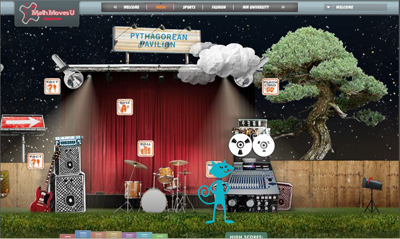
Maths Moves U is an online game for 12-15 year olds. This is more of an extention game than a remedial maths game.

The game moves you through different areas of math practice! Children choose an animal character and customize the colour of the collar, fur, and tail. The can choose their grade range prior to play. Other options include saving your character to begin or registering to create a locker for extra benefits, including access to new characters and monitoring of your progress.

From there, students can choose to go to several screens, where they can work on flash cards, play math games, take a quiz, take a poll, or work on facts.Tutorial help is available with the quizzes. Background music which is lively can also be turned off for better concentration.

Enter Math Moves University for worksheet practice on many math topics downloaded as a pdf document. A math dictionary is also available.

Clicking on the navigation along the top can also take you to various areas. Opportunities to register pop up during play but are not required at this site. This site requires Flash and Adobe Acrobat.

Tutpup.com

Tutpup is an online game site that allows students to compete against students from all over the world in math or spelling contests.

You are able to use the site without registration, but joining does allow you to save student accomplishments. Note that spelling is pronounced with a British accent (sometimes a little thick for my students to understand), and spellings will be British! Teachers sign up and can create a class identity; only teachers have to put in their real names.

Check out the Help for Parents link for additional information about registration and how to use the site. You can choose to allow students to compete with students outside their classroom, outside their school, or just within their own class. Teachers can also lock the class list to prevent anyone else from joining. Students must wait for an opponent to appear to participate in the activities.. As soon as a competitor appears, each student sees the same game and tries to answer each question faster than his opponent. Players can see their progress throughout the game, as well as the time remaining. Be aware: this site is still in Beta and requires Flash.

My remedial maths students love this site! I logged in the other day to see if any of my classes were playing outside of school time. One of my lowest ability students had played a number of games and was actually ranked 1st in Australia and 2nd in the World (for the past 24 hours). I was able to share the screen dump I took of his ranking with him and his teacher and let all the other students know how well he'd done. This had such a positive effect on his self esteeme and I was able to share it with his father who was very proud of him. It also encouraged my other remedial students that they too had a chance to be first in Australia (if not the world!) and their game playing outside of school also increased.

Students can, like my remedial champion, play games at levels they are comfortable with, however we have included this as part of a weekly timestable program and they are only allowed to play games inclass time based on their timestable of the week. It is amazing to hear them say "oh I know that one now". I love their motivation while they're playing and it's one of the highlights of my week.